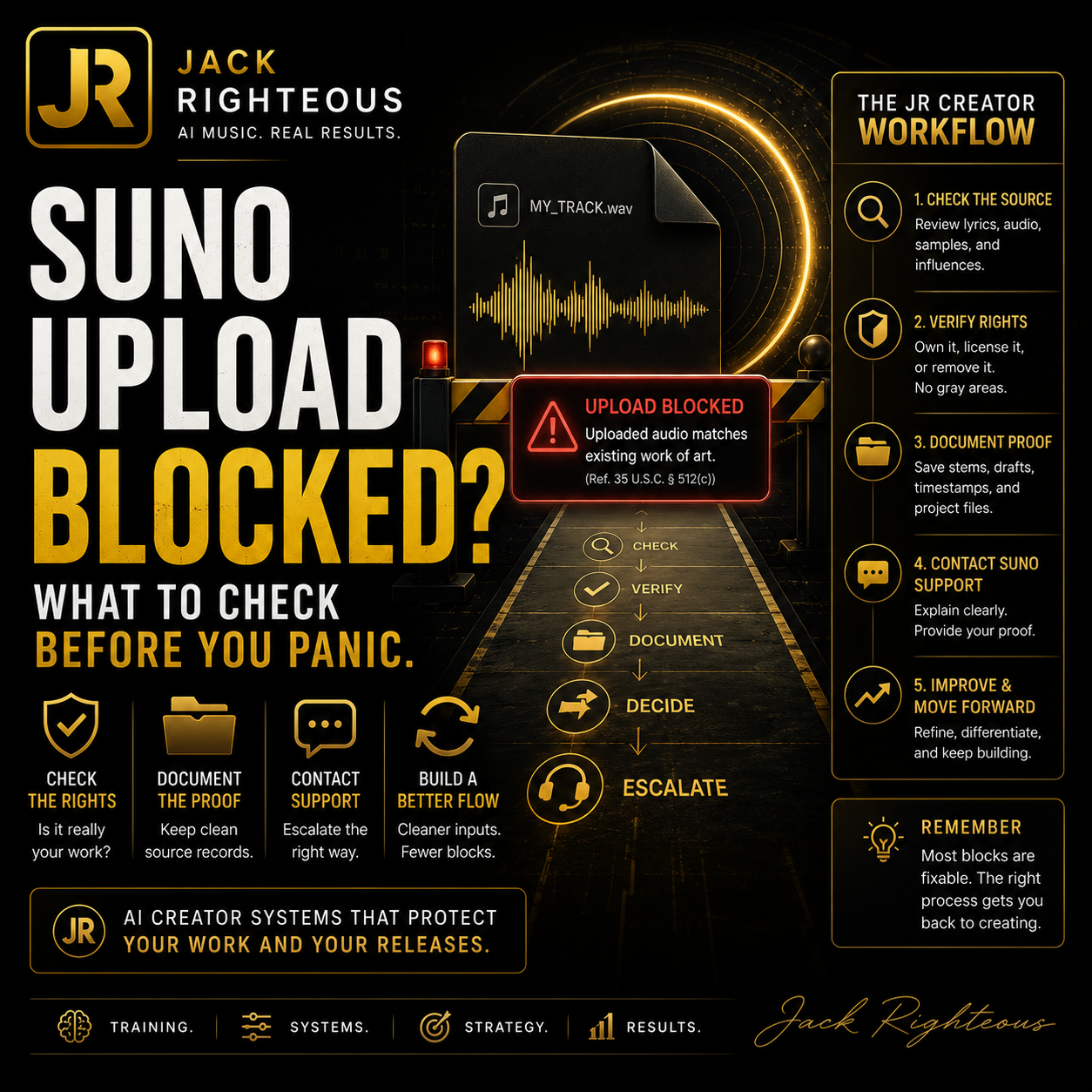
Suno Uploaded Audio Matches Existing Work of Art: What To Do
Gary Whittaker
Suno Troubleshooting
Suno Says Uploaded Audio Matches an Existing Work of Art — What It Means and What To Do
By Gary Whittaker / Jack Righteous — Independent Creator Consultant · Updated June 30, 2026
If Suno blocks your uploaded audio with the message “Uploaded audio matches existing work of art,” do not assume you did something wrong. This updated guide explains what the warning may mean, why original audio can still be flagged, what to check before contacting Suno Support, and how to build a cleaner source-tracking workflow before using Suno Spark, Audio Upload, Cover, Extend, Studio, or release planning.
```Do not panic. Do not bypass. Build a cleaner rights-aware Suno workflow.
If this warning appeared while you were trying to upload audio, the safest first move is to diagnose the file, document what happened, and avoid trying to force the same file through.
The bigger lesson is simple: AI music creators need a repeatable way to track source audio, prompts, versions, references, rights notes, platform history, and release status before publishing or reusing material.
Quick answer
If you are trying to upload your own audio into Suno and you see this warning, the issue is probably happening before the music-generation step.
Uploaded audio matches existing work of art. Please upload a different audio file.
In plain language, Suno’s upload system may be detecting that your file matches, resembles, or contains audio connected to an existing work. That can include a previously released song, a fingerprinted recording, a sample, a loop, a cover element, a backing track, a reused Suno output, or a false positive.
It is not a prompt problem
A better prompt usually will not fix this because the file is being blocked before Suno uses it as a reference.
It is not proof of wrongdoing
The warning does not automatically mean your song was stolen, copied, or unusable.
It needs a rights check
The best next move is to check the source audio, document the issue, and contact Suno Support if needed.
No universal fix confirmed
Some users report false positives, but there is no confirmed universal user-side fix or public whitelist process for every account.
Do not bypass detection
Changing pitch, speed, noise, or file shape just to sneak past a warning can create more risk.
Use this as a system warning
The warning is a sign that your source-tracking workflow needs to be cleaner before serious release work.
The safest response is not to keep forcing the same file through. First, check whether the audio contains anything that could trigger a rights or similarity warning. If the file is truly yours and you believe the block is wrong, gather proof and contact Suno Support directly.
June 30, 2026 update: why this matters more now
This article was updated because Suno creators are no longer just making one-off songs. More users are using Suno for demos, references, catalog planning, brand music, creator campaigns, and release workflows.
Suno Spark also puts more attention on independent artists who want to move from casual generation to project-building. That makes source tracking, rights notes, and workflow discipline more important. A creator who cannot explain where an uploaded file came from, what was sampled, what was released, and what rights they control is not ready for serious publishing or campaign work.
This warning is not only a Suno problem. It is a creator systems problem.
If your files, prompts, drafts, exports, licenses, and release records are scattered, every platform problem becomes harder to solve. The fix starts before support. It starts with documenting your work.
Official confirmation vs creator observation
Because this issue involves rights-sensitive uploaded audio, it is important to separate what Suno officially documents from what users are reporting.
| Point | Status | How to use it |
|---|---|---|
| Audio Upload is a supported Suno workflow. | Officially confirmed | Suno describes Audio Upload as a way to bring a recorded idea, demo, or audio moment into the creation workflow. |
| Upload limits depend on plan level. | Officially documented | Suno’s help currently describes Basic uploads up to 60 seconds and Pro/Premier uploads up to 8 minutes. Always check your current account screen before assuming the limit. |
| Users must control the rights to their uploads. | Officially required | Do not upload material unless you have the rights, licenses, consents, permissions, power, and authority needed to use it. |
| Original creator files can still be flagged. | Community observed | Treat this as a possible false positive, not automatic proof that the file is unsafe and not automatic proof that Suno is wrong. |
| Suno has a universal public whitelist for this warning. | Not confirmed | Do not promise yourself or customers that the warning can be cleared automatically. True rights owners should contact Suno Support. |
| Pitch-shifting, speed-changing, or disguising the file is a fix. | Not recommended | That can look like an attempt to defeat detection. It is not a clean creator workflow. |
What I can and cannot help with
I am Gary Whittaker / Jack Righteous, not Suno Support.
I cannot access your Suno account, remove a warning, reverse an upload block, review your private upload history inside Suno, or guarantee that Suno will accept a file.
What I can do is help you understand the likely workflow issue, check your own file more carefully, prepare a clearer support message, and build a better source-tracking system before you release or reuse AI-assisted music.
Who this guide is for
This guide is for creators who are trying to upload audio into Suno and do not understand why their own file is being blocked.
- Independent musicians uploading original songs or demos.
- Suno users uploading a voice memo, beat, hook, riff, or reference track.
- Producers uploading unfinished instrumentals, stems, or exported projects.
- Songwriters testing melodies, choruses, rough recordings, or voice ideas.
- Creators who already released a song and now want to use it as a reference.
- Beginners who are confused because they made the audio themselves.
- Suno Spark-minded creators preparing a stronger artist, brand, or campaign workflow.
The key point is simple: original audio is not always treated as safe by an automated upload system. If the file has been released, fingerprinted, sampled, reused, or built from recognizable source material, it can still be flagged.
What Suno may be checking before it accepts uploaded audio
When you upload audio as a reference, Suno is not only checking whether the file plays correctly. It may also be checking whether the audio appears connected to protected material, previously released music, recognizable recordings, commercial samples, another person’s voice, or other audio that may create a rights issue.
This matters because uploaded audio can influence what Suno generates next. If someone uploads a copyrighted song, a released master recording, a cover, a remix stem, or a sample they do not control, the platform could be asked to create new music from source material the user may not have permission to use.
Suno may be trying to answer this question before generation starts:
“Is this uploaded audio safe for this user to use as creative source material?”
If the system is not comfortable with the file, it may block the upload instead of letting the user continue.
Why your original audio can still be flagged
This is the frustrating part. You may know the song is yours. You may have written it, sung it, recorded it, exported it, and uploaded it yourself. The system may still block it.
1. The song was already released somewhere
If the track has already been uploaded to Spotify, Apple Music, YouTube, TikTok, SoundCloud, BandLab, DistroKid, TuneCore, CD Baby, Audiomack, Bandcamp, or another public platform, Suno may recognize it as an existing work.
Example: You release your song through a distributor. Later, you try to upload the same song into Suno as a reference. Suno may see it as an existing published recording, even though you are the creator.
2. The track may be in a fingerprinting or content-identification system
Some platforms use audio fingerprinting. That means a system creates a digital match pattern for a recording. If your track is already public, distributed, claimed, or scanned somewhere else, it may be recognized by automated systems.
Fingerprinting can help protect creators, but it can also create confusion when the creator wants to reuse their own released audio inside another platform.
3. The file contains loops, samples, or stems from another source
A track can feel original while still containing parts that came from another source. This can include:
- commercial drum loops, guitar loops, piano loops, or producer loops;
- sample-pack material;
- third-party vocal chops;
- downloaded acapellas;
- remix stems;
- background music from another creator;
- beats leased from a producer;
- sound effects or audio beds from a library.
Even if you are allowed to use the material in some situations, Suno may still treat the upload as risky if the file contains material that appears connected to someone else’s work.
4. The melody or arrangement may resemble something known
Sometimes the issue is not a direct sample. It may be a melody, hook, chord movement, vocal phrasing, rhythm, or arrangement that resembles another work.
This can happen by accident. Music shares patterns. But if the uploaded audio sounds too close to existing material, the system may still stop it.
5. The file may include background material you forgot about
Creators often upload rough recordings without realizing what is inside the file. A voice memo, phone recording, livestream clip, rehearsal recording, or exported demo may contain:
- music playing in the background;
- a TV, radio, or YouTube clip nearby;
- a reference song used while writing;
- a producer tag;
- a copyrighted beat under the vocal;
- another person’s voice or performance.
These small details can matter because the upload system is not judging your intent. It is checking the file.
6. It may be a false positive
A false positive means the system flagged something as a problem even though the file may actually be safe.
False positives can happen with automated systems. If you are confident the audio is yours and you can prove it, document the issue and contact Suno Support directly.
7. Special note for keyboard recordings
Keyboard recordings can be confusing because a creator may honestly say, “I played this myself,” while the exported audio still contains preset accompaniment, arranger keyboard material, built-in rhythm patterns, demo-style backing, looped phrases, MIDI style packs, or recognizable melody lines.
If your file came from a keyboard, workstation, arranger, MIDI setup, or music app, check whether it contains:
- auto-accompaniment or arranger styles;
- built-in rhythm patterns or demo grooves;
- keyboard preset performances, style packs, or MIDI phrases;
- commercial loops, backing tracks, or sample-based accompaniment;
- a recognizable melody, cover fragment, or song-like phrase;
- audio that was previously uploaded, distributed, or fingerprinted elsewhere.
If you truly own the performance, try exporting a short clean section that contains only your original playing, with no auto-accompaniment, no demo pattern, no backing track, no lyrics from another work, and no recognizable cover melody. This is not a bypass tactic. It is a way to remove unnecessary risk from the file you are asking Suno to evaluate.
What this error does not automatically mean
When creators see this warning, they often jump to the worst conclusion. That is understandable, but it is not always accurate.
| Common fear | Better interpretation |
|---|---|
| “Suno thinks I stole the song.” | Not necessarily. The system detected a possible match or rights risk. |
| “My song is not original.” | Not necessarily. Original work can still be flagged, especially if it was already released or fingerprinted. |
| “A better prompt will fix it.” | No. This is an upload issue, not a prompt issue. |
| “I should change the pitch or speed to get around it.” | No. Do not try to hide a match. That can create more risk. |
| “There is nothing I can do.” | You can check the file, test a clean excerpt, gather proof, and contact Suno Support if needed. |
| “This has nothing to do with release planning.” | Wrong. This is exactly why creators need source records, rights notes, and version history before publishing. |
Start here: the creator-safe troubleshooting path
Use this order before opening a support ticket.
Check whether this exact file is already public
If the exact audio is already on Spotify, Apple Music, YouTube, TikTok, SoundCloud, BandLab, Bandcamp, Audiomack, or another platform, that may be enough to trigger a warning.
If yes, make a note of where it was released and when.
Check whether the file contains anything you did not fully create
Look for samples, loops, leased beats, acapellas, cover melodies, remix stems, reference vocals, producer tags, background audio, or other voices.
If yes, create a cleaner version using only material you fully control.
Try a short, clean excerpt
Instead of uploading the full track, try a short section that is clearly yours. Use 20 to 40 seconds of an original vocal, melody, keyboard part, guitar part, piano part, or rough demo with no background material.
This is not about hiding the song or defeating detection. It is about removing unnecessary risk from the test file, especially if the full export contains backing tracks, loops, arranger keyboard parts, or previously released audio.
Save evidence
Take a screenshot of the error. Write down the date, time, file name, file type, browser, device, account plan, and where in Suno the issue happened.
Contact Suno Support if it still looks wrong
If the file is yours, you control the rights, and a clean excerpt still fails, contact Suno Support with a clear explanation and proof that you created or control the audio.
Update your creator records
Whether the issue gets resolved or not, update your tracking notes. Record what file was blocked, what you tested, what you sent to support, and what answer you received.
This is why your Suno workflow needs more than prompts
Upload blocks usually appear when the source file, release history, sample source, proof trail, or rights status is unclear. A cleaner workflow helps you know what you used, what changed, where it came from, and whether it is ready to reuse or release.
The Free AI Music Starter Kit is the best next step if you need a simple creator system before you go deeper into Suno Spark, song branding, release readiness, or paid training.
Has a solution been identified?
Official solution: not publicly confirmed for every situation. The safest answer is that Suno Support remains the proper route when you own or control the blocked audio and believe the warning is wrong.
Community workaround: partial and inconsistent. Some users report better results from shorter, cleaner excerpts or smaller sections, but others report that even short original clips can still fail. Do not present chunking, pitch changes, speed changes, noise, or file manipulation as a real fix.
| Action | Use it? | Why |
|---|---|---|
| Contact Suno Support with proof. | Yes | This is the cleanest path when the file is yours and the warning appears incorrect. |
| Try a short clean original excerpt. | Yes, carefully | Useful when the full file may contain extra material, background audio, accompaniment, or a previously released master. |
| Remove third-party loops, samples, backing tracks, or covers. | Yes | This reduces legitimate rights risk before upload. |
| Split a file into chunks to force it through. | Not as a promised fix | May isolate a problem section, but it is not an official solution and can be misused as a bypass tactic. |
| Pitch-shift, speed-change, distort, or hide the audio. | No | This looks like an attempt to defeat detection and can create more risk. |
What not to do
Do not try to bypass the warning
Do not pitch the file up or down, speed it up, slow it down, add noise, reverse it, chop it into pieces, or otherwise alter it just to sneak past the upload block.
That is not a clean fix. It can create more platform risk and may make your support request harder to explain.
You should also avoid uploading the same failed file repeatedly without changing your understanding of the issue. Repeating the same attempt usually does not solve the problem.
The better approach is to diagnose the file, remove legitimate risk where possible, and contact Suno Support when the block appears to be a false positive.
Checklist before contacting Suno Support
Before opening a support ticket, answer these questions as honestly as possible.
Did you compose, record, and produce this audio yourself?
Do you own or control the rights to every part of the recording?
Has this exact audio ever been released, distributed, uploaded, monetized, claimed, or registered elsewhere?
Does the file include samples, loops, stems, vocals, melodies, covers, interpolations, or references from another creator?
Was any part of the file built from a leased beat, producer pack, remix kit, acapella, or commercial loop library?
Can you provide project files, stems, export dates, metadata, session screenshots, distribution records, or other proof?
Have you tested a short clean excerpt, such as 20 to 40 seconds of the most original section?
Do you have a screenshot of the exact warning?
If this came from a keyboard, DAW, GarageBand-style app, or arranger workflow, can you identify exactly which sounds, styles, loops, or presets were used?
Did the same warning appear on multiple files, or only on one specific recording?
What proof can help if this is a false positive?
If you contact support, you do not need to write a legal essay. You need to make the situation easy to understand.
Useful proof may include:
- project files from your DAW or recording app;
- stems or separate track exports;
- screenshots showing the session timeline;
- export dates or file metadata;
- lyrics or songwriting notes;
- distribution records showing you own or control the release;
- links to your own released version, if the track is already public;
- receipts or license documents for any samples, loops, or beats used;
- your Suno subscription receipt or creation record if the work started in Suno;
- a short explanation of what you changed between the original file and the clean test excerpt.
This article is not legal advice. It is a practical troubleshooting guide for creators. If you are dealing with a serious rights dispute, commercial release, publishing conflict, takedown, Content ID claim, or unclear ownership, consider getting qualified legal help before using the audio in another project.
What this has to do with Suno Spark readiness
Suno Spark is not just another feature announcement. It is a signal that independent artists using Suno will need stronger project discipline. Grants, mentorship, campaign support, and public artist development all require a creator to know what they are building and what they control.
If you want your music project to be taken seriously, you need more than a good song generation. You need a simple record of:
- what idea started the song;
- which audio files were uploaded;
- what prompts and style directions were used;
- which versions were kept, rejected, edited, extended, or remastered;
- what material came from you, Suno, a loop pack, another platform, or another creator;
- what you plan to release, pitch, promote, or keep private.
The creator who documents the process is in a stronger position than the creator who only exports songs. This is the same reason I keep pushing starter kits, checklists, prompt records, rights notes, and release-readiness steps. It is not busywork. It is the difference between random output and a creator system.
Use this as your starter workflow
Before you upload, publish, remix, extend, or submit a song for a bigger opportunity, use this simple workflow.
Name the song purpose
Is this a demo, a public release, a brand song, a private reference, a campaign asset, a playlist track, or a test?
Log the source files
Write down every audio file used, where it came from, who made it, and whether it was released before.
Track the Suno steps
Record what you uploaded, what you prompted, what you extended, what you covered, what you remastered, and what version became the keeper.
Check the rights risk
Mark whether the song includes third-party material, AI-generated lyrics, uploaded vocals, sample packs, released masters, or unclear source audio.
Decide the next move
Do not send every song straight to release. Decide whether the song needs editing, a better prompt pass, a clean vocal, a visual identity, a support ticket, or a rights review.
Glossary: simple explanations for technical terms
| Term | Plain-language meaning |
|---|---|
| Uploaded audio | A file you add to Suno so it can be used as a reference or starting point. |
| Reference audio | Audio used to guide the style, sound, melody, rhythm, or feel of a new generation. |
| Existing work of art | A song, recording, performance, or audio work that may already exist publicly or be protected by rights. |
| False positive | When a system flags something as a problem even though it may not actually be one. |
| Fingerprinting | A technology that recognizes audio by creating a digital match pattern for a recording. |
| Content ID | A system used by some platforms to identify music or video that matches existing uploaded works. |
| Sample | A piece of existing audio reused in a new track. |
| Loop | A repeating musical part, often from a sample pack or producer library. |
| Stem | One separated part of a song, such as vocals, drums, bass, or guitar. |
| Distributed master | The final version of a song that was released to streaming platforms or public services. |
| Suno Spark readiness | The habit of treating your AI music work like a real artist project, with source notes, song purpose, version history, and rights awareness. |
Support message template
Copy, paste, and edit this message before sending it to Suno Support.
Subject: False positive: original uploaded audio blocked as “existing work of art”
Hello Suno Support Team,
I am receiving an upload error when attempting to use my own original audio as a reference in Suno.
The message shown is:
“Uploaded audio matches existing work of art. Please upload a different audio file.”
I believe this may be a false positive. The uploaded audio is my original work, and I own or control the necessary rights to use it.
Details:
- Suno account email:
- Date and time of issue:
- Device and browser:
- Page or feature used:
- Suno mode or model version, if known:
- Account plan:
- File format:
- File duration:
- File name:
- Was this played live on keyboard, guitar, piano, voice, or another instrument? Yes/No
- Keyboard model, DAW, app, or recording software used, if relevant:
- Does the recording include auto-accompaniment, arranger styles, demo patterns, loops, backing tracks, or preset rhythm parts? Yes/No
- Has this exact audio been publicly released before? Yes/No
- Has it been distributed to Spotify, Apple Music, YouTube, TikTok, SoundCloud, BandLab, Audiomack, Bandcamp, or Content ID? Yes/No
- Does it contain third-party samples, loops, acapellas, cover melodies, remix stems, producer tags, or leased beats? Yes/No
- Did a shorter clean excerpt also trigger the same warning? Yes/No
Proof I can provide:
- Project/session screenshots:
- Stems or separate track exports:
- Distribution or ownership records:
- Lyrics or writing notes:
- Receipts or license documents for any third-party materials:
- Screenshot of the warning:
Please review whether this upload was blocked incorrectly and let me know what information you need to verify that I control the audio.
Thank you.
FAQ: Suno uploaded audio matches existing work of art
Does this mean Suno accused me of stealing?
No. The warning means the upload system detected a possible match or risk. It does not automatically prove intent, theft, or infringement.
Can my own released song trigger the warning?
Yes, it can. If the song is already public, distributed, fingerprinted, or claimed somewhere, it may be recognized as an existing recording even if you are the rights holder.
Can a keyboard recording trigger the warning?
Yes. A keyboard performance can include auto-accompaniment, demo patterns, preset phrases, backing tracks, or recognizable musical material that may raise a match or rights concern.
Should I pitch-shift or distort the file?
No. Do not alter a file just to sneak past the warning. That is not a clean workflow and can make the issue harder to explain.
Should I contact Jack Righteous or Suno Support?
Contact Suno Support for account-specific upload review. Use JackRighteous.com for creator-side workflow guidance, documentation systems, release-readiness planning, and troubleshooting education.
What is the best first step after reading this?
Download the Free AI Music Starter Kit, start tracking your source audio and project history, then use the support template if you believe the warning is a false positive.
Related JackRighteous.com resources
Use these next if this issue is part of a bigger Suno workflow problem.
Free AI Music Starter Kit
Start here if you need a clearer system for AI music ideas, song direction, source notes, and beginner workflow setup.
Download FreeSuno Spark Guide
Understand what Suno Spark means for independent artists, brand songs, creator campaigns, and readiness.
Read the GuideSuno Meta Tags Guide
Use structure and tags to guide Suno more clearly after your source audio and rights notes are clean.
Open the GuideSuno Prompt Guide A–C
Use this if your next problem is not upload blocking, but weak prompt direction or unclear song setup.
Open Prompt GuideSuno Blocked My Own Song
Read this next if your issue is tied to copyright flags, upload errors, or confusion around your own release.
Read NextFind Your Sound
Go deeper when you are ready to build a more serious Suno workflow for prompt control, version tracking, and release preparation.
Go DeeperFinal word
If Suno blocks your upload, slow down. Do not panic, do not bypass, and do not assume the warning is proof that your music is unusable.
Check the file. Check the source. Check whether it was released. Check whether it contains loops, samples, backing tracks, keyboard styles, or another person’s material. Save your proof. Contact Suno Support if the block appears wrong.
Then build the part most creators skip: a real source-tracking workflow. That is what protects your music, your time, and your next move as an AI music creator.
Source links reviewed for this update
This article is independent commentary and creator workflow guidance. It is not Suno policy, legal advice, or account support.