Find Your Voice · Spoken Audio Production · PDF-first training
One script. One intentional voice. One finished audio asset.
Master the Voice — AI Spoken Audio Starter is practical, beginner-friendly training for turning an approved script into a clear spoken performance you can review, improve, save and document.
Choose a suitable workflow with ElevenLabs, Musicfy or Suno Speech. Learn the transferable production method once, then follow instructions specific to the tool you use. You do not need to use all three platforms—or subscribe to all three—to complete the exercises.
C$5 one-time · Digital PDF package v1.1
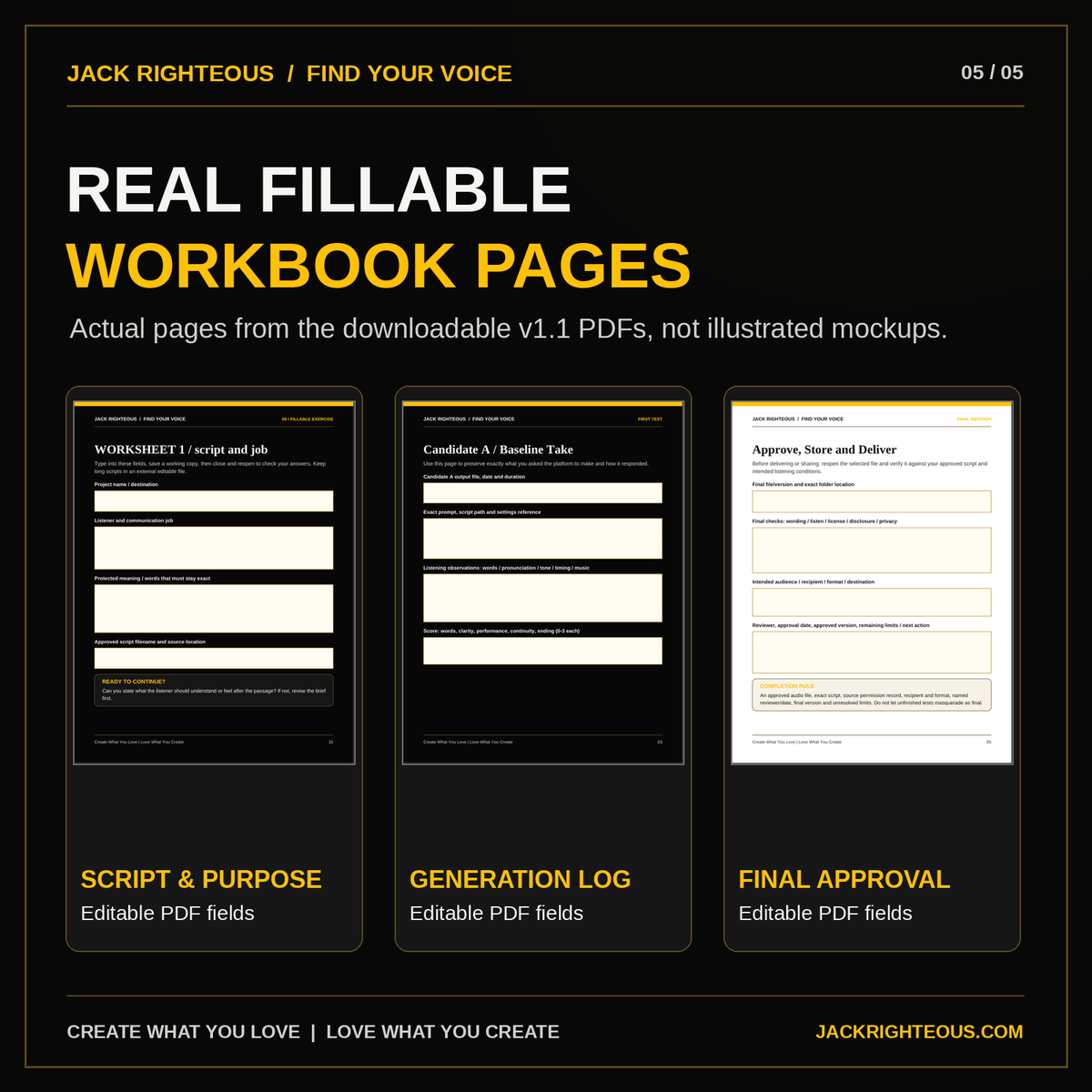
Includes a 36-page fillable workbook, two versions of a 5-page fillable production management log, and a Read Me First file. Delivered together in one ZIP. No Excel file, physical shipment, coding or API setup required.
What's inside the download
01 · Spoken Audio Starter Workbook36 pages of step-by-step training: choosing the right workflow, writing for the ear, directing a voice, testing speech, fixing pronunciation and performance, comparing candidates, documenting approvals and exporting one useful result.
02 · Voice Production PDF LogFive-page reusable fillable record for source script, tool and settings, permission checks, candidate versions, listening notes, approved export, reviewer, final file location and remaining limitations.
03 · Printer-Friendly PDF LogThe same five-page working record in a lighter, fillable format for printing or handwriting. Pick the dark or light version; you do not need to complete both.
Read Me First explains how to save clean originals, create project copies and organize your scripts, audio exports and logs. The PDFs track file names; they do not embed your finished audio recordings.
Three tools, three different starting points
ElevenLabs · Direct text-to-speech and narration
Use a prepared script with a voice appropriate for the intended audience. Test natural pacing, emphasis, pronunciation, clarity and model-dependent settings. The workbook keeps beginner text-to-speech separate from advanced voice design, cloning, agents and APIs.
Musicfy · Voice performance and authorized conversion
Explore supported spoken-word experiments and voice-conversion workflows with appropriate permission for the source voice. The guide explains that conversion, singing and direct text-to-speech are different tasks, and shows how to recognize unwanted singing, repeated words or an unstable performance before approving the result.
Suno Speech · Spoken performance with music
Use Suno Speech when the project benefits from a spoken creative performance and generated musical backdrop—for example, a story passage or an introduction. This is a beta workflow; musical accompaniment and available controls should be checked in the current interface. The guide does not promise a music-free export option.
Feature labels, model behavior, account options and terms may change. The workbook distinguishes general skills from platform-dependent instructions. Results and commercial permissions are not guaranteed.
What you'll learn to do
-
Define one audio job: decide who is listening, what the message must communicate and whether it needs dry narration, transformed performance or speech with music.
-
Prepare a speakable script: adjust sentence length, natural pauses, numbers, names, quotations and pronunciation without changing protected meaning.
-
Select the correct workflow: use an appropriate available voice and controls rather than treating the same prompt as a universal command.
-
Test and evaluate: compare examples using clarity, meaning, pronunciation, delivery and technical usefulness; the workbook includes a clearly labeled fictional scored example.
-
Repair one problem at a time: refine the script, performance direction, voice selection or workflow based on an actual listening observation.
-
Document and deliver: confirm source permissions, approve one version and save its file, script, settings and decision record.
Practical examples and quality checks
You'll see a sample introduction developed from a written brief through voice selection and quality review. The fictional comparison scores help explain how to decide between candidates; they are teaching examples, not proof that each service will reproduce those exact results.
The pronunciation exercise shows how to record an intended name, language or dialect, the observed problem, an attempted correction and the result. The final-asset check includes reviewer, approval date, audience, version and unresolved limitations.
Who this guide is for
- Authors, podcasters, educators and storytellers producing a short narration or character introduction.
- Music and video creators adding spoken openings, transitions or promotional audio.
- Small brands, faith/message creators and independent artists developing a clear spoken communication asset.
- Beginners who want a repeatable PDF-first method before exploring advanced voice-production systems.
This is not a full voice-cloning, audiobook production, dubbing, agent-development, mixing or API course. It is not a substitute for the broader Find Your Voice Foundation, which helps you determine what you want to communicate before producing an audio performance.
Responsible voice and music use
Use only source recordings, scripts and voices you have the right and consent to use. Keep records of permissions and check the relevant platform's current commercial terms. This guide does not grant permission to imitate someone else's voice or guarantee copyright ownership, monetization or distributor approval.
Musicfy relationship disclosure: Jack Righteous has a commercial partnership with Musicfy. This guide includes Musicfy because it serves certain documented voice and music workflows; its capabilities and limitations are discussed separately from ElevenLabs and Suno Speech.
How to use your purchase
- After checkout, download and unzip your Master the Voice — AI Spoken Audio PDF Package. Keep the original files unchanged.
- Open the fillable training workbook and prepare one script for one real audio purpose.
- Choose the platform route that fits your job; skip the other routes unless comparison is useful.
- Save a working copy of either the standard PDF Production Log or the printer-friendly version. Record tests, voice/source permissions and final decisions.
- Save, close and reopen your completed PDFs to check your answers. Keep long scripts and exported audio in separate project files and record their locations.
PDF form fields have fixed visible space when printed. For longer answers, preserve your full notes in a separate editable file and reference it in the log.
Common questions
Do I need all three platforms?
No. Pick the workflow available to you. The exercises compare tool choices but do not require accounts with every provider.
Does it teach text-to-speech, voice cloning or singing?
It primarily teaches how to make and approve one spoken audio asset. ElevenLabs direct text-to-speech is the most straightforward narration route. Musicfy's conversion and vocal workflows and Suno Speech with musical accompaniment are separate options. Unauthorized voice cloning is not taught.
Is Excel required?
No. You receive a fillable training PDF and two alternative fillable versions of a reusable five-page PDF log. Both logs perform the same job.
Is this the same as the Find Your Voice Foundation?
No. Find Your Voice Foundation develops your identity, message and point of view. Master the Voice focuses on producing and quality-checking the spoken audio output.
Will this one-time guide receive every future update?
No automatic future-version entitlement is implied by this standalone one-time purchase. Check your original purchase and any active membership terms for applicable updates.
Already own JR training or a membership?
Check the access attached to your account before buying again. If your current purchase or membership includes this guide, use Member Access Help rather than purchasing the same resource twice.
Digital educational material only. Availability, settings and terms can change. No specific generation, publication, rights-clearance or financial outcome is guaranteed.
Create What You Love | Love What You Create.
↑ Back to top